
SilverStar OSP1.0 - App Store
You'll be able to see results in few seconds.
Publisher Description
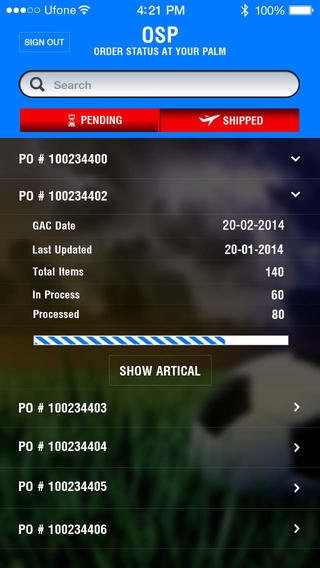
Silver Star stands for something very unique and exclusive... No one has done this before in Pakistan. Changing 100 years culture into a modern manufacturing of soccer balls was a great big challenge for people who are working for century in this industry. Silver Star brings experience people together with culture which took our company beyond barriers not only in Pakistan but also Globally. The idea of launching this industrial standard was to bring focus of the world that Pakistan still has great people who can walk with the global economy and understand international standards. Silver Star is always forefront in introducing new manufacturing techniques and innovative product range. Today our soccer balls and keeper gloves are being played by the world leading teams and players at top level. Our power lies in continuous support by our customers, our professional team of people around us, great workers supporting and working together to achieve our objectives. It is about to become one stop solution for team-sport. While thinking and moving into ECO friendly environment Silver Star will be the first ever equipment factory in South Asia launching healthy environment for workers and community. Down the road when people look at us they will know that this great tree was grown in Pakistan by Pakistanis. Great ideas happens when great minds get together... Silver Star is committed to produce reliable, environment friendly and best quality product with the aim to maximise its customers satisfaction as well as to fulfil its social and legal obligation towards workers and community. It is 3rd party approved facility with SA8000, ISO 9000, ISO 14001, OSHAS 18001.
Requires iOS 7.1 or later. Compatible with iPhone, iPad, and iPod touch.
About SilverStar OSP
The company that develops SilverStar OSP is Moftak Solutions. The latest version released by its developer is 1.0.
To install SilverStar OSP on your iOS device, just click the green Continue To App button above to start the installation process. The app is listed on our website since 2014-05-24 and was downloaded 0 times. We have already checked if the download link is safe, however for your own protection we recommend that you scan the downloaded app with your antivirus. Your antivirus may detect the SilverStar OSP as malware if the download link is broken.
How to install SilverStar OSP on your iOS device:
- Click on the Continue To App button on our website. This will redirect you to the App Store.
- Once the SilverStar OSP is shown in the iTunes listing of your iOS device, you can start its download and installation. Tap on the GET button to the right of the app to start downloading it.
- If you are not logged-in the iOS appstore app, you'll be prompted for your your Apple ID and/or password.
- After SilverStar OSP is downloaded, you'll see an INSTALL button to the right. Tap on it to start the actual installation of the iOS app.
- Once installation is finished you can tap on the OPEN button to start it. Its icon will also be added to your device home screen.
Program Details
System requirements
Download information
Pricing
Version History
version 1.0
posted on 2014-05-24
Disclaimer
Official App Store Link
We do not host SilverStar OSP on our servers. We did not scan it for viruses, adware, spyware or other type of malware. This app is hosted by Apple and passed their terms and conditions to be listed there. We recommend caution when installing it.
The App Store link for SilverStar OSP is provided to you by apps112.com without any warranties, representations or guarantees of any kind, so access it at your own risk.
If you have questions regarding this particular app contact the publisher directly. For questions about the functionalities of apps112.com contact us.
